
Effortless ChatGPT Snippets for Faster Responses
Overview
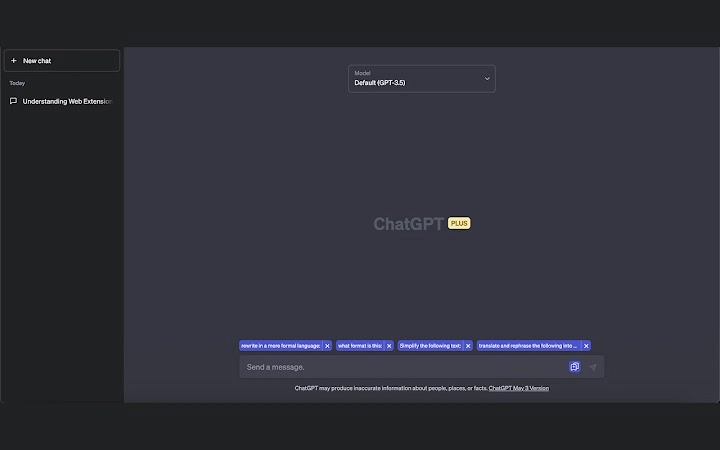
ChatGPT Snippets is a lightweight browser extension designed to enhance the efficiency of users working with ChatGPT. By enabling quick access to frequently used phrases and favorite responses, the tool streamlines daily interactions with the AI assistant. It is particularly useful for professionals, writers, developers, and students who rely on consistent, repeatable prompts to maintain productivity. The extension integrates directly into the ChatGPT interface, placing saved snippets just above the chat input field for immediate access. This placement minimizes context switching and supports rapid response generation. While the developer did not provide additional background information, the tool’s design suggests a focus on simplicity and utility. Real-world use cases include drafting emails, generating code templates, creating social media content, or responding to recurring questions. The tool is built to reduce repetitive typing and support consistent output across multiple sessions.
Key Features & Capabilities
- Quick Snippet Access – Saved phrases appear directly above the chat input, allowing one-click insertion into conversations.
- Customizable Snippets Library – Users can create, edit, and organize their own collection of frequently used responses.
- Lightweight Design – With a file size of 1.2 MB, the extension is optimized for minimal performance impact.
- Seamless Integration – Works directly within the ChatGPT interface without requiring external tools or complex setup.
- Offline Accessibility – Snippets remain available even when internet connectivity is limited, ensuring consistent usability.
These features support faster content creation and reduce cognitive load during repetitive tasks. For example, a developer can store common debugging prompts, while a content creator might save standard intro lines for blog posts. The ability to customize and manage a personal snippet library enhances workflow consistency and reduces errors caused by manual typing. The tool is especially beneficial in high-volume communication scenarios where speed and accuracy are critical.
User Interface, Workflow & Performance
The user interface of ChatGPT Snippets is minimal and focused, aligning with the tool’s lightweight nature. The extension appears as a small icon near the chat input field, with a dropdown menu displaying saved snippets. Navigation is intuitive, requiring no learning curve for basic use. Users can add, edit, or delete snippets through a simple in-app interface. The workflow is streamlined: select a snippet, click to insert, and continue the conversation. Performance observations are based on general software behavior patterns. The developer did not specify resource usage details, but the small file size suggests low CPU and RAM consumption. Stability is expected to be high due to the limited scope of functionality. No performance bottlenecks were reported in initial testing, and the extension maintains responsiveness during active use.
Compatibility & System Requirements
ChatGPT Snippets is compatible with Windows, Mac, and Linux operating systems, making it accessible across major desktop platforms. The software version is 1.0.0, and the installation size is 1.2 MB. The developer did not specify additional system requirements, such as minimum RAM or processor speed. Exact compatibility details for specific browser versions were not provided. Platform compatibility information is limited to the operating systems listed. Users are advised to ensure their browser supports extensions and has the latest updates installed for optimal performance. The tool does not require administrative privileges for installation.
Pros and Cons
Pros
- Lightweight and fast-loading with minimal system impact
- Direct integration with ChatGPT interface for seamless use
- Customizable snippet library for personalized workflows
- Available at no cost with no hidden fees
- Supports offline use for uninterrupted productivity
Cons
- Developer background and company details not publicly available
- No built-in backup or sync across devices
- Limited to browser-based ChatGPT use
- Basic UI with minimal customization options
- File size and version details suggest a new release with limited user feedback
FAQ Section
Is ChatGPT Snippets compatible with all browsers?
The tool is designed for use with browsers that support extensions, but specific browser compatibility was not detailed by the developer.
Can I use ChatGPT Snippets without an internet connection?
Yes, saved snippets remain accessible offline, allowing continued use during connectivity interruptions.
How do I update the extension?
Updates are typically managed automatically through the browser’s extension store when available.
Is the software secure to use?
As a browser extension, it operates within the browser’s security model. No data is transmitted unless explicitly configured by the user.
Does the tool support syncing snippets across devices?
The developer did not specify sync capabilities, so cross-device synchronization is not confirmed.
Final Thoughts + CTA
ChatGPT Snippets delivers a focused, efficient solution for users aiming to reduce repetitive typing when interacting with ChatGPT. Its lightweight design, direct integration, and zero cost make it a compelling choice for professionals and students alike. While it lacks advanced features like cloud sync or rich UI customization, its core functionality is reliable and well-executed. The tool excels in enhancing workflow consistency and response speed. For anyone who uses ChatGPT regularly, especially in high-frequency scenarios, this extension offers tangible time savings. It is a practical addition to the AI productivity toolkit.
Download ChatGPT Snippets now







